|
| Comic created using HTML code taught during a live class instruction from Code Wizards HQ |

Oooh! Did you hear me squeal? In this household where my high school senior eats, breathes and lives computer programming code, I was excited to get asked to review a computer programming coding classes for kids from
CodeWizardsHQ which is right up our alley.

What is CodeWizardsHQ?
CodeWizardsHQ offers live classes in computer programming. The program is a full, comprehensive coding curriculum to prepare children for college and career success, not a piece-meal course. Check out the benefits and what makes the program unique. These are 12-week
courses, as you can see that is curriculum intended for all students,
and they also offer classes designed for homeschoolers - homeschool computer curriculum
. For the purposes of this review, I was given the opportunity to sit in on one live class.
CodeWizardsHQ offers LIVE, online coding classes intended for students as young as 5th Grade through High School, or 10th Grade. The courses are one hour live classes each week for 12 weeks and offer a certificate upon completion of each of their courses.
What sets them apart is that they offer the "Human Connection". An instructor conducts interactive live classes where an instructor teaches students in real time, not with CDs, video, or self-paced courses.
PLEASE NOTE: I am obviously a homeschooling mom with homeschooled kiddos and I typically review products and curriculum intended specifically for the homeschool community. This product, however, is designed for all students, regardless of how they receive their education. However, since the subject matter of learning to code also appeals to homeschoolers, they are making a special homeschool offer on their
homeschooling page. From what I could tell, CodeWizardsHQ is offering special pricing based on the number of students and the flexibility to choose your own date and class time for homeschoolers, but it looks like the content is the same as the regular classes. Check out their
class times and enrollment costs.
Homeschooling classes:
Regular classes:
How Did We Use It?

The first step was watching a video about the program and then taking part in a webinar that explained the purpose of CodeWizardsHQ and why coding is important. During the meeting, I took a few screenshots that have some nice graphs and information about why coding is important and why the way it is usually taught falls short which lead CodeWizardsHQ to offer the classes the way they do.
Next, I signed up my son who is a senior this year and lives, eats and breathes code already. His class was scheduled for one hour starting at 1:00, but before the class started, I wanted to make sure everything worked well with my computer and sound and connections so that he could go straight into the class with no technical issues. When I did, I noticed there was an earlier class getting ready to start, so the instructor allowed me to sit in on that class to preview it before my son's scheduled class would begin. Everything worked well, and I even tried my hand at code.

Once we got the log-on information, it took us to our dashboard. This is where the coding takes place - in the editor tab of the dashboard on the site. Once you have signed up for a specific class time, you log onto your dashboard and then click the "Join Class" button on the upper righthand corner to take part in an online class. The class button launches the Go To Meeting app to conduct the class with a live instructor. While the class is in progress, your dashboard screen is also open (I found it easier to use a split screen so I could see what was going on in the class and still work within my editor. My son's computer takes split screen situations a step further because he actually has two screens side by side on his desktop). There are some other sections of the dashboard as well, such as the Community tab that allows you to ask questions on a forum style platform, and another tab that shows your progress and still another that shows your attendance, and finally, a tab that contains the files. We were also able to choose an avatar icon for the profile from among pre-selected avatars to personalize it a bit. My son's avatar icon is the boy with glasses in an orange shirt as you see above.
I don't know if everyone positions their screens in this way, but this is how I viewed the class. On the left of the screen is the dashboard work, and on the right is the Go To Meeting class in session:
This is how the on-screen editor looks, which is where the work is done during class.

The classes take place online, so you need a computer. Since coding is involved, it works best on a PC based system rather than a mobile device. I'm also honestly not sure how well a Mac or Apple product would work. The class I got to review and that my son was scheduled for was an Intro to HTML class. During the class, there was a live instructor joined by real students. Some had their microphones open to talk and interact, but she gave the option to mute the mic and use the chat box which was my and my son's preference since we both have phone/speaking anxiety. I was relieved that the instructor allowed us to use the chat box instead. Also, when I first saw the class advertised, it looked like it would also use a Webcam, but I was also relieved to discover that this was not necessary. In fact, I didn't see the instructor at all but rather could hear her as she presented screenshots and Powerpoint-style presentations while she taught. And, after another student asked her, she assured us that she could not see us either.
Following are a combination of screenshots and in-person shots that took place during our classtime. The purpose of the specific course assigned to us was to receive an introduction to HTML - Hyper Text Markup Language - that is used across the web behind the scenes of what you see when you pull up websites. After instruction on how to use the on-screen editor. what HTML is used for, and how to change the image, color, and text within the code, the instructor assigned a project to write HTML code to create a 9-panel cartoon strip which was based on superheroes:
As the class progressed, the instructor - whose name was Liz, by the way, and she was absolutely amazing - explained how the CodeWizardsHQ dashboard editor worked and walked the students through the process of designing a comic strip using HTML.
Before the hour was up, all of the students had completed a comic strip that consisted of about 9 frames, and a link was generated so the work can be shared online if you want to show it off.
Here is the finished project from the class:
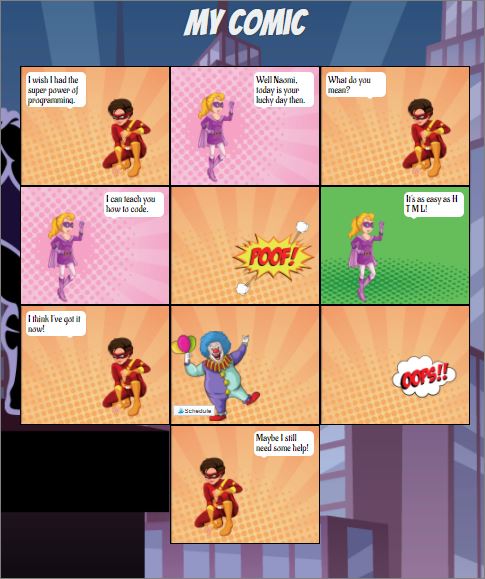
Upon completion, you get a link to share: https://grahams.codewizardshq.com/intro/story.html
And, here is the other one:
https://grahams.codewizardshq.com/intro/story.html
And, here's what the code looked like to create that comic:

The concept of using a live, interactive class to teach coding is brilliant! I wasn't sure how it was going to go once the class began, though, because quite often live seminars and such have a great deal of distractions from background noise and individual issues from attendees. I was super impressed at how the instructor conducted the class and interacted with each of the students. If she detected feedback or distracting background noises, she kindly asked the students to mute their mics, which was so helpful! She also has the patience of steel with each of the students regardless of their learning level. She was able to quickly address any questions anyone had and walk them through struggles using screens on her end where she could see real-time work of each student.
While, the interactive class was well done, and the instructor was easy to understand and on top of things, both my son and I were actually more impressed that CodeWizardsHQ also realizes the way typical coding is taught is basically useless in the real world, since most platforms use a dedicated sandboxed program that is proprietary only to one specific use. Whereas, CodeWizardsHQ uses code that is used elsewhere and across the web, such as HTML. Especially my code-devouring son was super impressed by that and really thinks this is one of the best drawing points that sets CodeWizardsHQ apart from the rest.
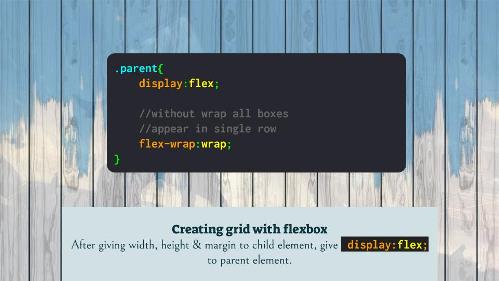

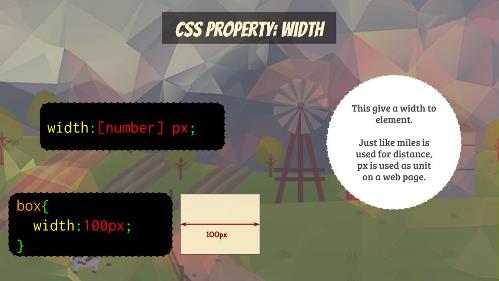
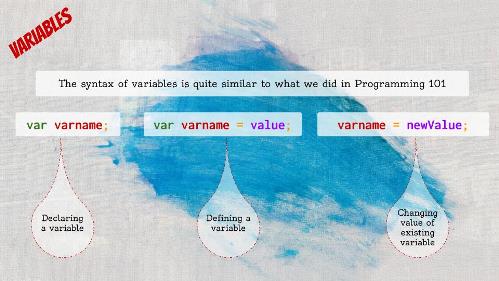
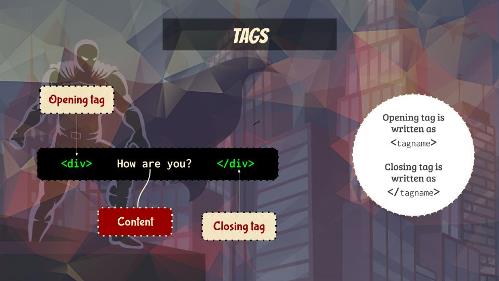 Besides the Intro to HTML, they offer several other classes, including CSS:
FIND CODEWIZARDSHQ ON SOCIAL MEDIA @:
Read what other members of the Homeschool Review Crew thought by clicking on the picture below: