Puddle Jump Through Life With Us - Living... Loving... Growing... washed in the love of Christ

Puddle Jump Through Life With Us - Living... Loving... Growing... washed in the love of Christ

Become a Fan on Facebook

Twitter Followers

Flowing River of Blessings


It's time for a good book
Showing posts with label Online Math Tutor. Show all posts

Monday, October 29, 2018

Homeschool Review Crew - Math-Whizz

Review, #hsreviews, #mathwhizz, #whizzeducation, #math, Whizz Education, Math Whizz, math tutor


I was thrilled to get a chance to review a 12-month subscription for 1 student to Math-Whizz  from Whizz Education.


What is Math-Whizz?

I thought it was pretty cool that the tutor was created using AI Artificial Intelligence designed to adapt to each student's needs as they go. It's meant to be used as a supplement to your math curriculum, but I found it to be a pretty thorough supplement especially when you tap into the reports and resources in the parent/homeschool teacher section.


I received a one-year subscription for one student to use Math-Whizz. This is an online math tutoring site that helps make math engaging and interactive by presenting it online with eye-catching graphics and turns it into a game of sorts by presenting tokens for every 15 minutes of screen time.


I received two separate log-ins, one for my daughter and one for me as the parent/teacher. I will show you how the parent/homeschool teacher log in looks a little later in this review. Here is how it looks from the child/student's log-in perspective while in use:


You begin with a thorough assessment so the program can provide tutorials designed specifically for your child's level of learning. After the assessment is complete, your child logs on and sees this screen from where he or she can choose where to go, whether they want to start the tutoring session, replay lessons for extra practice, visit the dictionary, other tools and resources, or use tokens to play games or buy on-screen toys, or design their screen with colors they prefer.


My daughter had a lot of fun enjoying the games:


The following two short videos show an example of a couple of the lessons inside the tutorial section of the program:


And, here are some screens that show some of the tutorials and tests in progress:

a


Since the site runs on Flash, I had to first accept that it was ok for my browser, Chrome, to run it which is really just an added step and no big deal, but I do want to point it out since it may make a difference as to what devices it is able to run on. For instance, iPhones don't allow for  Flash. Though I did get around this by trying it out on a browser app called Puffin that allows you to play Flash on an iPhone, but it was much more optimized and fluid, easier to interact with, on the laptop PC.


The program not only provides excellent tutorial at the child's level but also allows the parent or homeschool teacher to view reports to see whether or not the child is progressing at their expected age level and where they excel or need extra practice.


Some of the charts show you at what age level the child began placement and how they have progressed compared to their actual age. You can choose a weekly progression chart, monthly, or other timeframe options:


There are also award certificates to provide for special accomplishments:


How Did We Use It?

I first logged on and set up my student who is 12 and in 7th grade. The next step was to finish an assessment before the lessons would begin. Once the assessment was complete, it was time to start the tutoring sessions.


Each tutoring session contains 10 questions that are first presented in a way to show the student how the problems are to be worked. Then, it gives the child a chance to try it, and if they get it wrong, there are on-screen demonstrations showing how it should have been done. After the student gets a certain number of answers correct, they unlock special features, such as the Jump button that allows them to skip part of the tutorial after they have answered enough correctly. My daughter was pretty stoked about that option.


After the tutorial, the student is presented with a 5-question test before receiving "coins" for progress and then proceeding onto the next tutorial session to start again.

The entire time, the child is earning on-screen coins for time spent learning. The goal is to spend 30 minutes a week.


What Did We Think?

Overall I think this site is very well done and a fun, interactive way to enjoy a math tutor that is completely animated online and not face to face intimidating as a real-life tutor may be. The site has amazing content and presentation and gets the job done in a fun manner. Even the games that the child is allowed to play after earning tokens are math oriented. Some of the ways a concept was presented were so clever that I had never thought to present it in that way in my teaching, so in our homeschool, I tapped into that during our math curriculum use, and it really helped my daughter visualize the concepts better.

FIND Whizz Education ON SOCIAL MEDIA @:


Read what other members of the Homeschool Review Crew thought by clicking on the picture below:

Math-Whizz {Whizz Education Reviews}


Crew Disclaimer


Tuesday, June 20, 2017

Homeschool Review Crew - Geometry UnLock Math

Review, #hsreviews, #math, #homeschoolmath, #highschoolmath, #onlinemath, Homeschool math, middle school math, high school math, Homeschool math curriculum, online homeschool math, bite-size chunks, Unlimited Practice, automated grading


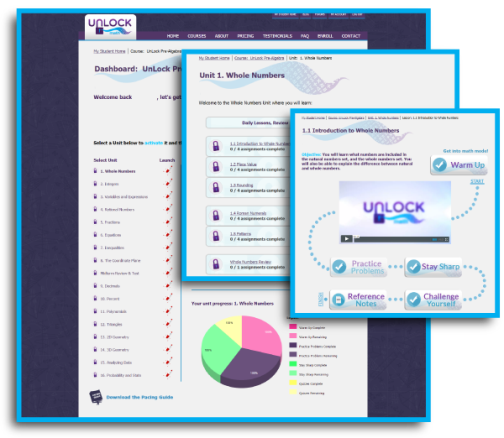
I was thrilled to get a chance to review UnLock Geometry from UnLock Math, the newest level available through the site and is the first course the provides immediate feedback after each question and also offers a new, updated parent and student dashboard.

UnLock Math offers a variety of levels, and other members of the Homeschool Review Crew have had the opportunity to review:

UnLock Pre-Algebra

UnLock Algebra1

UnLock Algebra2

UnLock Math, Review, #hsreviews, #math, #homeschoolmath, #highschoolmath, #onlinemath, Homeschool math, middle school math, high school math, Homeschool math curriculum, online homeschool math, bite-size chunks, Unlimited Practice, automated grading
FROM
UnLock Math Review, #hsreviews, #math, #homeschoolmath, #highschoolmath, #onlinemath, Homeschool math, middle school math, high school math, Homeschool math curriculum, online homeschool math, bite-size chunks, Unlimited Practice, automated grading

What is UnLock Geometry?

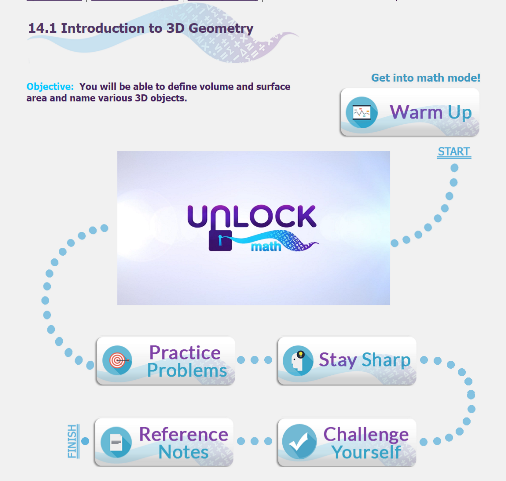
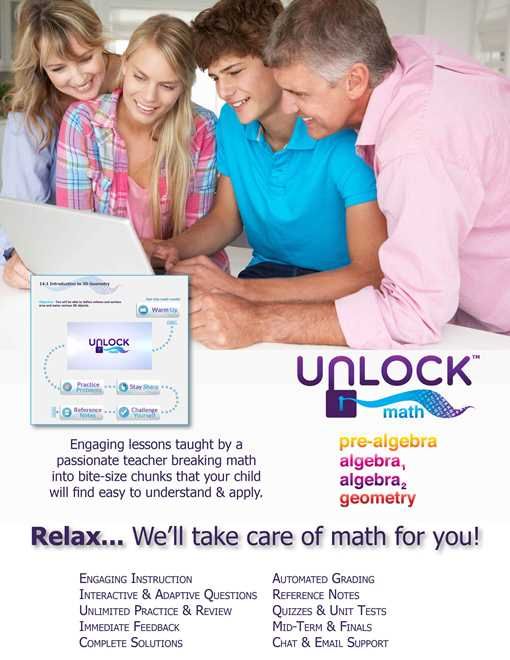
As the name of the product suggests, it is as if the student is unlocking each new segment, like a challenge. UnLock Math is an online math curriculum program that provides complete math programs which can be used in its entirety or as a supplement. The student "unlocks" segments of a 5-step process in each lesson. The way this program is set up is extremely logical. The student takes part in small segments of learning within each lesson. They follow the path to the next segment until each lesson and each section of lessons are complete.

UnLock Geometry includes 15 units:


Each lesson's steps include:
Warm Up - These are sort of like speed drills but aren't timed. They generate math questions, like adding and subtracting 1-3 digit numbers. There are about 10 questions to complete each time you unlock the Warm Ups.

Video Lesson - These lessons are short, seemed to be about 10 minutes or less per lesson. Sometimes there are fun parodies but are mostly a female instructor, Alesia Blackwood, explaining the new skill to be learned.


Practice Problems - After viewing the lesson, this section presents problems related to the newly learned concept or skill.

Stay Sharp - Similar to the Warm Ups, the student answers about 10 math questions.

Challenge Yourself - This one contains one challenge question that is sometimes in the form of a word problem and is, as the name implies, a bit more challenging than the other problems in the lesson.

Finally, there is a tab that includes the Reference Notes from the lesson that can be printed for review and reference, as it is in a PDF format.
I was asked to use the program with one student at least three days a week. The lessons each take about a half an hour to complete. If you use it every day, it will cover a complete 9 months worth of lessons.
UnLock Math, Review, #hsreviews, #math, #homeschoolmath, #highschoolmath, #onlinemath, Homeschool math, middle school math, high school math, Homeschool math curriculum, online homeschool math, bite-size chunks, Unlimited Practice, automated grading
There are a Parent Login and a Student Login. Within the parent log in, you are able to assign the course to the child and view progress reports which are also able to be viewed by the student on the Student Dashboard. The parent is also able to print the reports for record keeping.


UnLock Math, Review, #hsreviews, #math, #homeschoolmath, #highschoolmath, #onlinemath, Homeschool math, middle school math, high school math, Homeschool math curriculum, online homeschool math, bite-size chunks, Unlimited Practice, automated grading
How Did We Use It?

This couldn't have come at much more of an appropriate time. My high school Freshman was introduced to Geometry this year for the first time, so this arrived at the perfect time to offer it as a supplement to close any potential gaps.

UnLock Math, Review, #hsreviews, #math, #homeschoolmath, #highschoolmath, #onlinemath, Homeschool math, middle school math, high school math, Homeschool math curriculum, online homeschool math, bite-size chunks, Unlimited Practice, automated grading

What Did We Think?

I appreciate that the program presents enough information in one setting to learn a new concept but not too much as to overwhelm the student. I also appreciated that it allows for printing the Reference Notes. This is a big plus in my book since the child chosen for the review is huge on workbook text style of learning. I really like the way each lesson is presented, almost like a video game with levels to conquer, of course, in a learning style rather than a gaming format. The underlying concept is there, encouraging the student to accomplish each step within each lesson toward success.

FIND UnLock Math ON SOCIAL MEDIA @:


Facebook: https://facebook.com/UnLockMath Tag: @UnLockMath
Twitter: https://twitter.com/UnLockMath Tag: @UnLockMath
Pinterest: https://pinterest.com/UnLockMath Tag: @UnLockMath 

Read what other members of the Homeschool Review Crew thought by clicking on the picture below:
Pre-Algebra, Algebra and Geometry {UnLock Math Reviews}


Crew Disclaimer