Maybe it began when we caved and bought him his first Gameboy Advance in an effort to give him something to do on a 2-day 18-hour car ride when he was 6. Maybe it was my putting him into an Exersaucer at the age of 4 months where he started literally pressing buttons to get my attention. The buttons made animal sounds, and every time I would turn my back to him, he would hit a button to get me to turn back around and pay attention to him.
I don't know, but whatever got him started, my son is into computers. He's also into gaming. He is 14.
He was reading fluently by the age of 3, but getting him to sit down with a book now is near impossible. Though, there was a time he would pore over computer language books and inhale every line of code he could.
He is a freshman in high school this year, and we homeschool him. He is largely unschooled, but for the sake of record keeping and abiding by state requirements, I insist that he complete at least his core subjects each day before he is allowed to game or code.
I realize getting someone to sit down and watch a 9-minute video is a challenge, but he put together a video of just some of what his coding time entails. He coded for hours, took snips of it, and sped it up into super fast mode so as not to bore those who were kind enough to watch.
Meanwhile, in his "spare" time, this is what he is often found doing:
Puddle Jump Through Life With Us - Living... Loving... Growing... washed in the love of Christ

Flowing River of Blessings


It's time for a good book
Showing posts with label Computer Science. Show all posts
Showing posts with label Computer Science. Show all posts
Thursday, December 11, 2014


Friday, July 19, 2013
Schoolhouse Review: Homeschool Programming TeenCoder Java Series and Android Programming

My son and I have had the privilege of reviewing TeenCoder Java Series and Android Programming from Homeschool Programming, Inc.


We received a download of the TeenCoder Java Series, which is a two-part/two semester course that includes first and second semester curriculum. The first semester covers Java Programming, and the second semester covers Android Programming. Both semesters are set up to be presented in similar ways, with lessons presented inside of chapters and a DVD video summary introductions to each chapter, for more visual emphasis.
We received both semester’s course load as pdf downloads as well as two separate DVDs of video presentations that summarized each lesson in a fun recap with clipart style color animation and easy-to-read graphic fonts.
Everything he needed was in the downloads. The DVD is a bonus for students who are more visually motivated – which describes my son, who loved the DVD summaries.
The downloaded information required a PC that runs Windows XP or more current versions of Windows, or a Mac that is running at least an OS 10.5.8. My son downloaded it onto his Windows 7 laptop.
Since my son is our resident computer guru, when I received the link for the download, I just handed it over to him. I did the same with the DVDs, though I did take a peek at the DVDs, and I did check in on him throughout his work time to oversee his progress and to get an idea of what he was learning.
 The curriculum is intended for 9th through 12th graders, so I knew my 13-year-old son, who is going into 8th grade this fall, was slightly under this age requirement. However, this child lives, eats and breathes computer programming languages, so I knew he would be excited about giving it a try.
From our experience, the TeenCoder Java Series seems to be an excellent computer science course. I have written for internet websites about programming as a profession, and this course appeared to be on par with some of the courses out there aimed at professionals seeking certification.
During the first semester, students learn about how to write Java code. In the second semester, they learn to write their own Android mobile device applications.
I was very happy that nothing additional had to be purchased. The learning took place using a free version of “the industry standard Eclipse development environment” which anyone interested in pursuing a career using Java programming needs to know.
Each chapter contains between one to four lessons and usually includes an activity at the end before continuing onto the next chapter. The chapters and lessons explain, in detail, a programming concept and provides sample coding examples. It uses hands-on activities, and allows students to write their own programs using the chapter topics as a guide.
Here are some screenshots of some of the projects he completed:


The course encourages students to put their creativity to work and to add their own personal touches to each project. We had so much fun with the programmed results, such as the program my son wrote in lesson 6 that automated a fill-in-the-blank style story using adjectives, nouns and adverbs that his sisters and I gave him. The program plugged these words into the pre-written story that my son chose to use, and the results were hilarious.


We were given 8 weeks to use the curriculum for the purposes of this review and were expected to finish at least one chapter per week. Out of the two semesters worth of work, working at a pace of an average of two chapters per week, we covered the 16 chapters in the first semester and downloaded the 15 chapters in the second semester’s book to look it over and get started with that as well. My son has not yet plunged in with both feet yet on the second semester course work, but he has looked it over enough to get even more excited about Android programming. The layout of how the material is presented is very similar in nature to the first semester's format, only it will cover Android programming.
For most students, one hour per session is probably a good recommended estimate for pacing the work to finish within each semester. My son, however, doesn’t like to break his focus once he’s locked into a programming mode. He did not work every day on the projects, but when he did, he worked diligently for more than one hour at a time. One afternoon, he even spent five hours completely engaged in the course.
My son was able to complete the TeenCoder Java Programming course entirely during our 8-week review period, and he is looking forward to learning how to program for the Android as well.
The TeenCoder Java Programming course and DVD is $90
Just the Java Programming course is $75
Just the Java Programming video is $20
The Android Programming course and DVD is $90
Just the Android Programming course is $75
Just the Android Programming video is $20
Buy together as a bundle and save:
The TeenCoder: Java year Pack courses and video is $155
The TeenCoder: Java Year Pack courses only is $130.00
The TeenCoder: Java Year Pack videos only is $30
Please read what other members of the Schoolhouse Review Crew thought of this and other products from this company, here, or click on the picture below:


Monday, April 1, 2013
Schoolhouse Review: Computer Science For Kids Bible Games for Microsoft Small Basic

The past few weeks, my son and I have been reviewing Computer Bible Games for Microsoft Small Basic from Computer Science for Kids, and I want to share what we thought of it.
I believe that in today’s computer-savvy world, if you are familiar with computer programming languages, you are sure to have an edge in the job market after graduation from college. The earlier you begin learning something new and technical, the more natural it will flow for the student.

Beginning Microsoft Small Basic

We received:
- The Computer Bible Games for Small Basic 4th Edition Download
- The E-Tutorial Download
- as well as the Beginning Microsoft Small Basic Programming Tutorial E-Tutorial Download
- and the Microsoft Small Basic v1.0 Application Download, which is a free download from Microsoft that is needed to run the other two downloads.
I received the download links and sent them directly to his computer for downloading. A minimum of Windows XP SP3 is needed to run the programs. He is operating a laptop that runs Windows 7.
The
E-Tutorial learning programs contain activities such as creating a savings
calculator, making a number guessing game, a state capitols game and a simple
drawing program. The Bible Games for
Small Basic build on these concepts and walk the student through Bible Games like:
- Noah’s Ark
- Daniel and the Lions’ Den
- Elijah and the Ravens
- The Good Shepherd
- The Prodigal Son
- The Lost Coin
- Bible Scramble
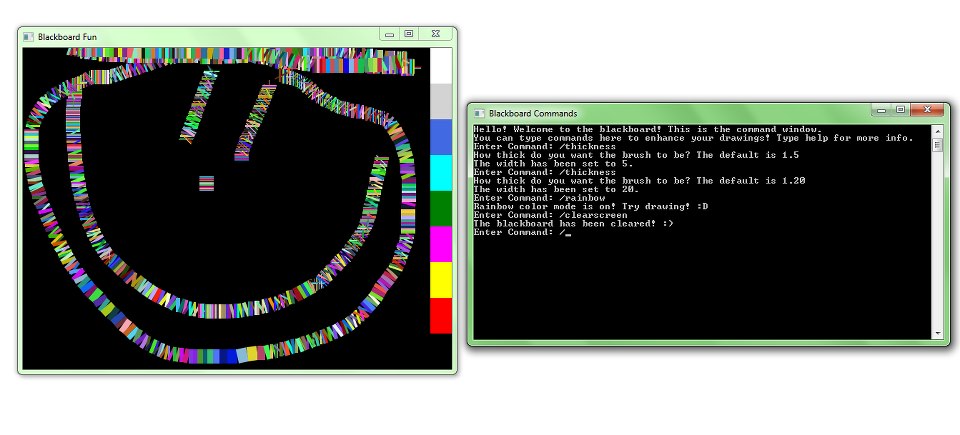
These are screen shots of the programs and games he created:




- $59.95 for paperback textbook plus E-Tutorial Digital Download with free shipping inside the US.
- Single User License Digital E-Book Download Only - $34.95
- Unlimited User Christian School Teacher Annual Site License Digital E-Book Download Only - $249.95
The Computer Science for Kids website states that the program is designed for Middle or High School level students. When I received the download information from Computer Science for Kids, it said that most students age 10 and above should be able to follow the tutorials. My son is 12 years old and is in the 7th grade. He found it extremely easy to use.
The program is intended to take 3 to 6 days for each lesson to fully understand it, taking a total of approximately 10 weeks to complete. However, the information states that those already familiar with computers may go at a faster pace. The latter was the case with my son. Since he had already been familiar with Small Basic, he completed the entire program and was creating the Bible games in less than two weeks.

My son found this program extremely easy to use. Keep in mind that my son has an extensive background in computer programming and gaming even at the age of 12. He has never had formal training in any of the computer languages, but he has explored several on his own and devours any computer programming tutorial books that he can get his hands on. He has been known to beg me for a huge JAVA book we found at a thrift store, and he is often difficult to pull away from the computer programming books at the library. However, the material in the Computer Science for Kids program was presented in a way that even a middle school or high school student who has never seen a computer before would be able to pick up and follow the self-paced tutorial guides with ease.
There are more challenging exercises included that are intended for 7th through 12 graders, and he kept begging me to complete those as well. Of course I said yes. How often do I hear my son beg to do school work?
I think the Computer Science for Kids tutorials are a great introduction to computer programming for middle school students.
Read more Schoolhouse reviews here, or click on the picture below:
Subscribe to:
Posts (Atom)